
Welcome to your Google Workspace Account.
Let's start to get your account setup, Gmail, Google Drive, Calnedar and more.
Google Workspace.
Setting up gmail
On your Phone
In both Android and iOS, please download and install the Gmail app if you do not already have it.
- In Gmail, like the picture of your Profile.
- At the bottom of the screen, click on Add another account.
- Choose Google
- Enter the new email address we sent you.
- Enter the one-time password.
- Accept the terms and conditions.
- You may have to set up a new password; do so.
- You should now be good to go.
In Google Chrome on a computer.
- Go to https://gmail.com.
You are most likely already logged in to your regular https://gmail.com account. - In the top right-hand corner, click on your profile picture.
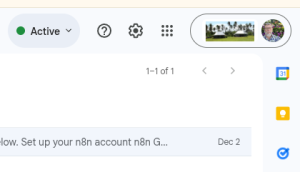
- Now click on Add another account.

- Enter your username and password.
- Accept Terms and Conditions if necessary.
- Enter a new password if necessary.
- If you want to create a whole new Chrome Profile for this new email address, you can, or keep it with your existing Profile.

managing Users
Please connect with me if you would like help getting the most out of Google Workspace for your staff and yourself.
Google Forms for staff.
We already have these forms for the YWAM Bases we are working with for Google for Non-Profit.
Let your staff know the URL to this page, https://digital.ywam.life/google-new-user/, and once they have filled it out, I can create their Google Workspace account for your people.
Setting up Google API
Before you can do any work with Google and N8N, you need to set up your APIs.
One-on-One Online
We provide one on one training, best done if you have a website with us.
Please make sure TeamViewer is installed.
Choose a time that suits you.
These times are from 2 PM to 5 PM Hawaii Time; you will see them in your Browser in your time zone.
You can book up to a day before.
Let's partner.
Let me know what it is you would like to do.
Email address
tony@ainet.biz